Build Interactive SCORM Courses with AI

Transform your Text, PDF documents, and presentations into interactive, SCORM-compliant courses compatible with all LMSs and TXPs within minutes—affordably. Create engaging learning experiences enriched with modern interactive activities, audio narration, images, and quizzes — powered by industry-leading artificial intelligence.

An all-in-one AI platform for creating, customizing, and exporting professional eLearning content. 57 block types, 7 AI generators, zero coding required.

57
Block Types
35+
Languages
7
AI Generators
4
Export Formats
app.scormbuilder.ai
SSCORMBuilder
Workspace
▣ Dashboard
✎ Course Editor
▭ Block Studio
⚭ Scenario Studio
AI Suite
✦ AI Course Generator
🎨 AI Media Studio
Library
▣ Templates
🎓 Academy
My Courses
✦ AI Generate+ New Course
🔍 Search courses…Newest ▾
Draft★ Template
▣ 211 blocks · 1.2
Draft★ Template
▣ 253 blocks · 1.2
Draft★ Template
▣ 192 blocks · 1.2
Course Editor

Intuitive, block-based authoring

Build courses by stacking and arranging modular blocks. Drag and drop 57 content types — from text and media to quizzes, flipcards, and hotspots. No coding, no complexity.

  • ✓57 block types across 5 categories
  • ✓Drag-and-drop reordering with floating toolbar
  • ✓Professional cover page with hero banner
  • ✓Live preview with course structure detection
57blocks
11language lab
5categories
Block Library
57 blocks · 5 categories
TitleLesson heading and banner
SubtitleSection heading inside a lesson
TextParagraphs, bold, italic
Bullet ListUnordered points
Numbered ListOrdered steps
CalloutA note that needs to stand out
QuotePull quote with attribution
StatementOne line, full width
AccordionCollapsible panels
TabsSwitchable panes
TimelineDated or sequenced events
DividerVisual break
ProcessNumbered stages
Two ColumnsSide-by-side text
Further ReadingLinked resources, opened in a new tab
Image + TextPicture beside copy, either side
ImageFull-width picture with caption
GalleryGrid, carousel or lightbox
VideoUploaded file or YouTube
AudioNarration or a recording
AI ImageGenerated from a prompt
File AttachA download the learner keeps
BannerFull-bleed image band
QuizSingle or multiple answer
AI QuizQuestions written from your content
Flip CardQuestion front, answer back
MatchingPair terms to meanings
SortingPut items in the right order
Fill BlanksType the missing word
HotspotClickable points on an image
Image SequenceStep through a series
Math QuizGenerated arithmetic
Label DiagramDrag labels onto a picture
Bucket SortDrag items into categories
In Video QuizA question mid-playback
EssayLong-form written answer
ChecklistTick off as you go
AssessmentScored, timed, pass mark
Voice InsertRecord into gaps in a track
Conversation PracticeSpeak both sides of a dialogue
Speak the WordsSay it, get scored
Oral ReadingRead a passage aloud
Dialog CardsTwo-sided practice cards
Memory GameMatch hidden pairs
Mark the WordsClick every word that fits
CrosswordClues across and down
Word SearchFind terms in a grid
Term GuessReveal letter by letter
Word BankVocabulary with audio
TableRows and columns
EmbedAnything with an embed code
PDF ViewerRead inline, no download
GraphBar, line or pie
ProgressWhere the learner has got to
Custom BlockYour own, from Block Studio
Branching ScenarioDecisions with consequences
ComparisonThis versus that
Drag any block into the page. 26 of the 57 grade the learner and report to your LMS on their own.

Not just content — blocks that grade themselves

26 of the 57 blocks are interactive. Drop one in and it scores the learner, reports to your LMS, and needs no setup from you.

In the player
Which format plays in every LMS?
A native video file
A SCORM package ✓
A shared web link
Scored Reported to LMS No setup
How blocks get placed
1
AI drafts the course
It picks the right block for each idea — a timeline here, a quiz there.
2
You edit and reorder
Drag blocks, rewrite copy, swap a quiz for a scenario in the visual editor.
3
Export to your LMS
Every block becomes standards-compliant SCORM, xAPI or cmi5.
AI-Powered

Generate entire courses with AI

Describe your topic and let AI build a complete course — modules, content blocks, quizzes, and assessments. Supports Claude, GPT-4, and Gemini models.

  • ✓Full course generation from a single prompt
  • ✓Multi-model support: Claude, GPT-4, Gemini
  • ✓Smart block selection based on content type
  • ✓Configurable duration, level, and language
AI Course Generator
✦ "Create a workplace safety course for new employees covering fire safety, first aid, and emergency procedures"
Generating with Claude...
✓ Generated: 3 modules, 12 blocks, 2 assessments
🔥
Fire Safety
4 blocks
⚗
First Aid
4 blocks
Media Studio

Create images & narration with 7 AI models

Generate professional images and audio narration directly inside the editor, powered by models from OpenAI, Google, Anthropic and xAI.

  • ✓Image generation (DALL·E 3, Nano Banana, Grok)
  • ✓AI audio narration with natural voices
  • ✓3 modes: Presets, Guided Builder, Pro
  • ✓Professional prompt engineering built-in
AI Media Studio
⚡ Presets
🎯 Guided
⌨ Pro
🎬
Cinematic
Film scene
📷
Product
Studio shot
📱
Social
Reel content
🎨
Portrait
Photography
Assessment

AI quiz generator & assessment studio

Paste your course text or upload a PDF, Word document or PowerPoint deck, and AI writes the questions from your own material — not from general knowledge. Choose how many and which types, then edit anything before you publish. Exports as SCORM so scores report straight to your LMS.

  • ✓Generate quiz questions from any document or pasted text
  • ✓Multiple choice, true/false and multi-select question types
  • ✓Every question editable — nothing is locked
  • ✓One-at-a-time flow with progress bar and animated results
  • ✓Configurable pass mark, scored and tracked in your LMS
Assessment Studio
Question 2 of 5
Pass: 70%
What is the first step in a fire evacuation?
Run to the nearest exit
Alert others and trigger the fire alarm
Gather personal belongings
Call the fire department
Confirm Answer
Export

One-click SCORM, xAPI & cmi5 export

Export production-ready packages in SCORM 1.2, SCORM 2004, xAPI, and cmi5 formats. Upload to any LMS and track learner progress immediately.

  • ✓SCORM 1.2, SCORM 2004, xAPI & cmi5 compliant
  • ✓Videos and media bundled in the package
  • ✓Sequential or free navigation modes
  • ✓Completion tracking with interaction scoring
Export Package
Choose export format
📦
SCORM 1.2
Most compatible
📦
SCORM 2004
Advanced tracking
📦
xAPI
Modern standard
📦
cmi5
xAPI + structure
✓ Ready to export — 3 modules, 18 blocks, 2 videos bundled
⇩ Export SCORM Package
Block Studio · New

Design your own branded blocks

Most courses look the same because every tool gives you the same fixed blocks. Block Studio is a free-form design canvas — shapes, icons, images, audio, and video — so you can build blocks that look like your brand and reuse them everywhere.

  • ✓Free-form canvas with snapping and alignment
  • ✓24 shapes, 84 icons, gradients and shadows
  • ✓38 designed templates to start from
  • ✓Save blocks once, reuse across every course
Explore Block Studio →
Block Studio
Before vs afterAfter
×Before: manual work
✓After: minutes, not hours
►
0:12
Scenario Studio · New

Build branching role-play scenarios

Practice beats theory. Scenario Studio lets you build branching role-plays where learners make decisions and live with the consequences — drafted by AI, then brought to life with character avatars, backgrounds, and voice narration. Build one, then drop it into any course.
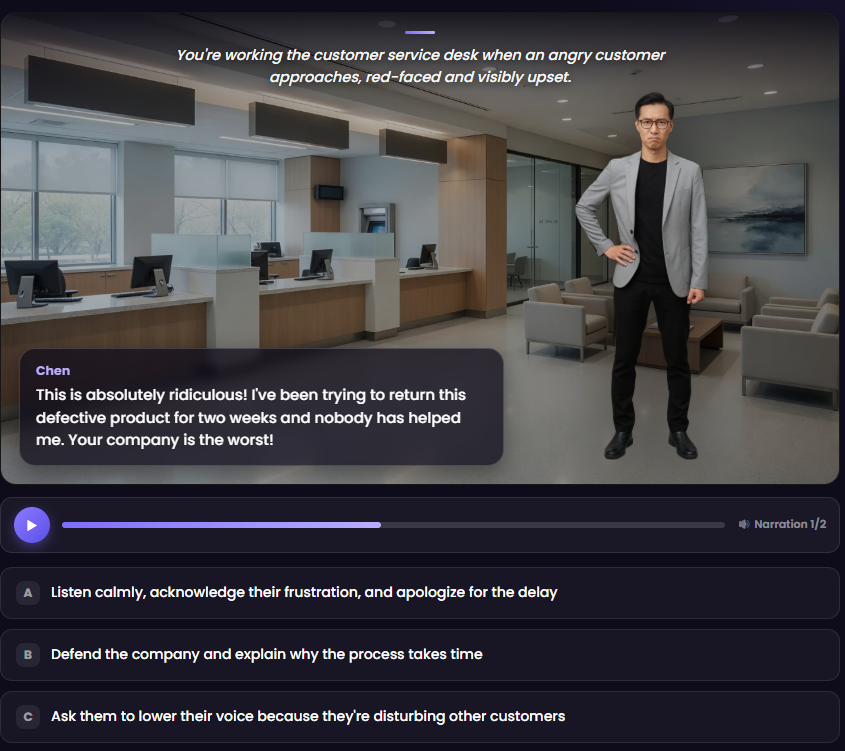
  • ✓AI drafts the whole branching story from a prompt
  • ✓Character avatars, backgrounds & voice narration
  • ✓Every choice leads to a different outcome
  • ✓Build once, reuse across every course
Try Scenario Studio →
A branching role-play scenario built in Scenario Studio: a customer-service simulation with a character, narration bar, and multiple-choice responses
Course Translation · New

One course, 35+ languages

Press Translate, pick a language, and get a complete editable copy — content, quizzes, module names and every player button. Full right-to-left support for Arabic and Hebrew. No XLIFF files, no agency, no waiting weeks.

  • ✓35+ languages, each shown in its own script
  • ✓Translates the interface, not just the content
  • ✓True RTL layout for Arabic, Hebrew, Persian & Urdu
  • ✓Your original course is never touched
Explore translation →
Translate this course
العربية
Arabic · RTL
Español
Spanish
日本語
Japanese
Français
French
Share for Review

Get feedback with one link

Send stakeholders and SMEs a link. They open the course in a browser — no account, no LMS, no SCORM download — and comment on the exact block they mean. Comments land in your editor with a link that jumps straight to it.

  • ✓Reviewers need no account and install nothing
  • ✓Comments anchored to the block they refer to
  • ✓Jump from a comment to that block in the editor
  • ✓Always shows your latest saved version
Explore review →
Review comments
Amara · 2h ago
Can we soften this wording?
↗ Handling an angry customer
Yusuf · Quiz 1
Option C is ambiguous.

A language lab, inside your LMS

Eleven speaking, listening and vocabulary activities that export as SCORM — for teachers whose school has an LMS but no budget for a lab.

Voice Insert
The student speaks into gaps in a recording, then hears it back as one take — model, their voice, model.
Conversation Practice
The course speaks a line, the student answers aloud, back and forth for as long as you write it.
Speak the Words
Hear a model, repeat it, and get scored on how much of it came through clearly.
And seven more
Oral reading, dialog cards, word bank, crossword, term guess, word search, memory game.

No hardware, no per-seat contract, no procurement meeting. It runs in the LMS you already have.

See the Language Lab →

See SCORMBuilder in action

From a blank topic to a SCORM package — this is the actual workflow inside the app.

What Our Users Say

Trusted by course creators and instructional designers worldwide.

The AI course generator alone saved us hundreds of hours. We used to spend weeks building a single SCORM package — now it takes an afternoon. The many block types give us incredible flexibility at a fraction of the price.
MO
Mariam Obaid
Instructional Designer, TechCorp
As an instructional designer, I love the flexibility Block Studio provides. Building reusable branded blocks saves hours of work while making every course look unique and professional.
DO
Dr. Marcela Ozerna
SANAKO ME
POWERED BY

Built with Industry-Leading Artificial Intelligence

SCORMBuilder orchestrates the world’s best AI models — for text, images and voice — so every course is generated at state-of-the-art quality.

Anthropic

Claude — AI Course Generation

OpenAI

GPT-4o, DALL·E 3, TTS Narration

Google

Gemini, Nano Banana

xAI (Grok)

Grok — Fast Reasoning

Simple, Transparent Pricing

One plan. Everything included. No hidden fees.

Everything Included
SCORMBuilder.ai Pro
$29/month
Everything you need to build professional courses
  • ✓Unlimited courses
  • ✓All 50+ interactive block types
  • ✓AI course generator (Claude, GPT-4, Gemini)
  • ✓AI media studio — 7 generators
  • ✓SCORM 1.2, 2004, xAPI & cmi5 export
  • ✓Block Studio
  • ✓Scenario Studio — branching role-plays
  • ✓Course translation into 35+ languages
  • ✓Share for review with block-level comments
  • ✓Assessment studio
  • ✓AI quiz generator — questions from your own documents
  • ✓No SCORMBuilder branding on exported courses
Start 14-Day Free Trial

Compare with competitors

PlatformPriceBillingAI
Articulate Rise 360$1,449/user/yearAnnual onlyYes ✓
iSpring Suite AI$1,290/user/yearAnnual onlyYes ✓
Easygenerator$1,399/author/yearAnnual onlyYes ✓
SCORMBuilder.ai$29/monthMonthly — cancel anytimeYes ✓

Rise 360 is sold as part of Articulate 360 (AI Personal plan). Competitor prices are list prices from each vendor's public pricing page, July 2026, and exclude tax. Plans and discounts may vary.

Frequently Asked Questions

Everything you need to know about building SCORM courses with AI.

What is SCORMBuilder.ai?

SCORMBuilder.ai is an AI course builder that turns a topic, PDF, or presentation into an interactive SCORM, xAPI, or cmi5 course in minutes. It costs $29 per month and exports to any LMS.

Which e-learning formats can I export?

You can export SCORM 1.2, SCORM 2004, xAPI, and cmi5, so your courses run in Moodle, TalentLMS, Cornerstone, Docebo, and any standards-compliant LMS.

How much does SCORMBuilder.ai cost?

One simple plan at $29 per month with everything included and no hidden fees, versus traditional authoring tools that cost hundreds to thousands per year.

Do I need design or coding skills?

No. You describe your topic or upload a document, the AI generates an interactive course with 57 block types, and you edit it in a visual editor before exporting.

Can I turn PDFs and PowerPoint files into courses?

Yes. SCORMBuilder.ai converts text, PDF documents, and presentations into interactive, SCORM-compliant courses enriched with quizzes, images, video, and AI audio narration.

Ready to build your first course?

Join course creators who use AI to build SCORM content 10x faster.

Start Your Free Trial →